

WooCommerce
Install Agenized for WooCommerce to connect your store, embed the chat widget, and enable catalog and order actions for your AI agents.
Agenized for WooCommerce is the WordPress plugin that connects your WooCommerce store to Agenized. It handles OAuth sign-in, chooses which Agenized Chat Widget appears on your storefront, links your site to Settings → Actions so agents can run WooCommerce tools, and can share store events and order webhooks for proactive messaging and automations.
This guide describes the plugin and the Setup screen in WordPress. Agent behaviour, enabled actions, proactive copy, safety, and hand-off are configured in the Agenized merchant app.
What the plugin does
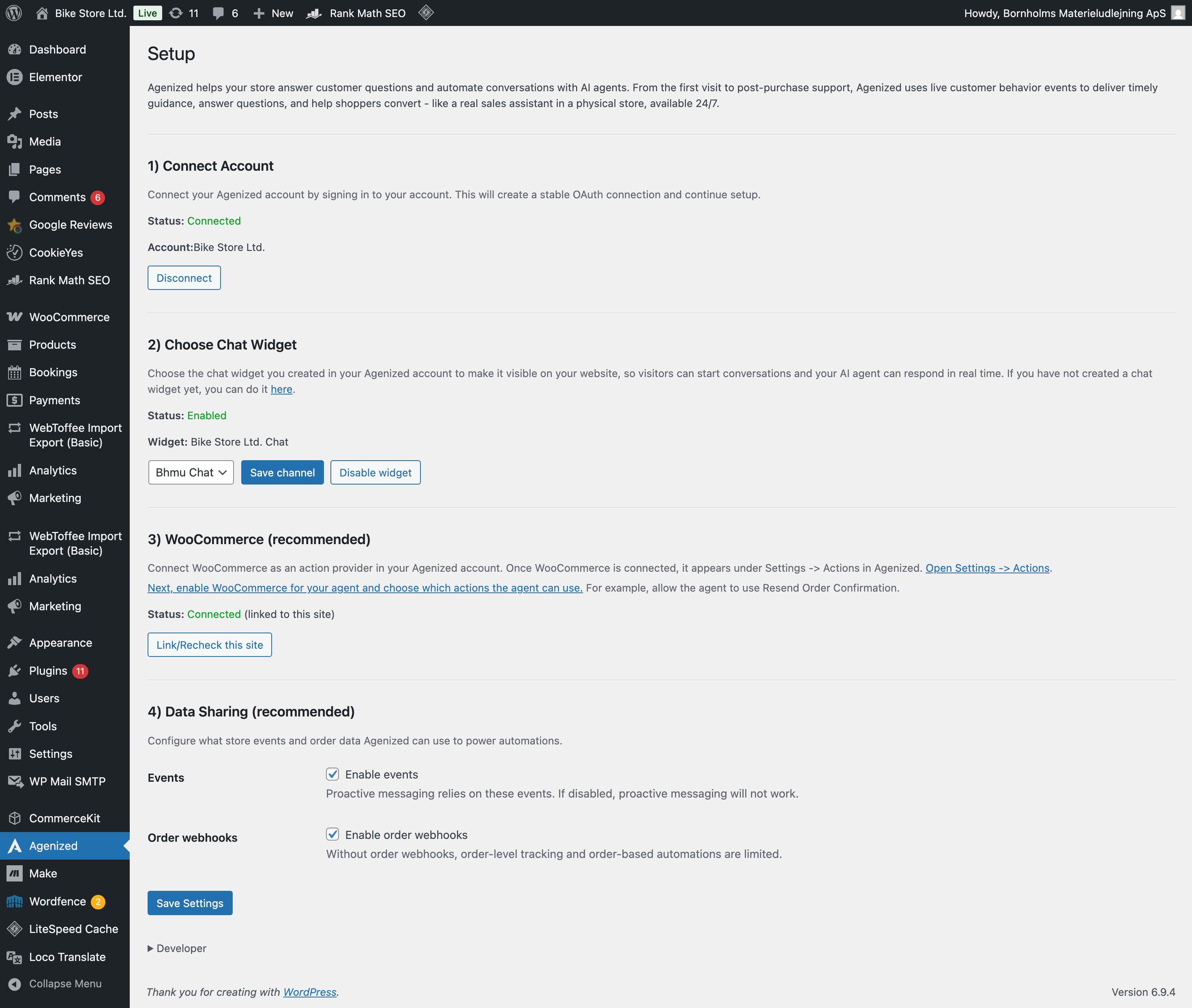
- Connect account. OAuth link between your WordPress site and your Agenized workspace.
- Choose Chat Widget. Pick the channel that powers the on-site widget visitors see.
- WooCommerce. Confirms your store is linked as the action provider for this site (REST credentials are managed under Settings → Actions → WooCommerce in Agenized; the plugin surfaces status and a link to continue setup).
- Data sharing. Optional events (for proactive messaging) and order webhooks (for order-level tracking and automations).
The plugin also helps you add sitemap and other sources so agents can use your site content as knowledge, consistent with the plugin readme feature list.
Setup in WordPress
After you install and open Agenized under the WordPress admin menu, use the Setup page to work through each step. You can disconnect OAuth, change the widget, recheck the WooCommerce link, and save data-sharing options from this screen.
WooCommerce actions in Agenized
Which Actions your agent can run (orders, products, cart, refunds, bookings, subscriptions, and so on) depends on your Agenized plan and how you enable tools under Agents → Actions. The merchant documentation for the WooCommerce connection itself lives under Settings → Actions → WooCommerce.
Learn more
- Agenized for WooCommerce on WordPress.org
- AI sales assistant for WooCommerce (product overview)